
Bypass iCloud lock from iPhone 4 on MacOS Via Sliver V5.5

Apple has a security feature (Icloud) in its iOS, is one of the tightest security systems, After restoring your iPhone 4 to factory settings, the iOS asks you to enter the last Icloud used in the iPhone 4 before performing the restore to verify the identity of the real owner of the iPhone 4 device. This feature is important and is intended to avoid misuse of the iPhone 4 device during thefts. But at the same time, some users have got into trouble because of it, when they have forgotten their iCloud credentials after hard reset iPhone 4. So, in this tutorial, we have brought the latest method to Bypass iCloud lock from iPhone 4 easily by following some simple steps.
iCloud Bypass Tool:
How to Bypass iCloud lock iPhone 4
- Download Sliver v5.5.dmg to your Mac then Double click on the file to open it.

- Drag Sliver to your application folder.

- Open a Terminal window.

- Type: sudo chmod -R 755

- Find Sliver then click on Show Package Contents.

- Find Resources Folder.

- Drag & Drop Resources Folder to Terminal
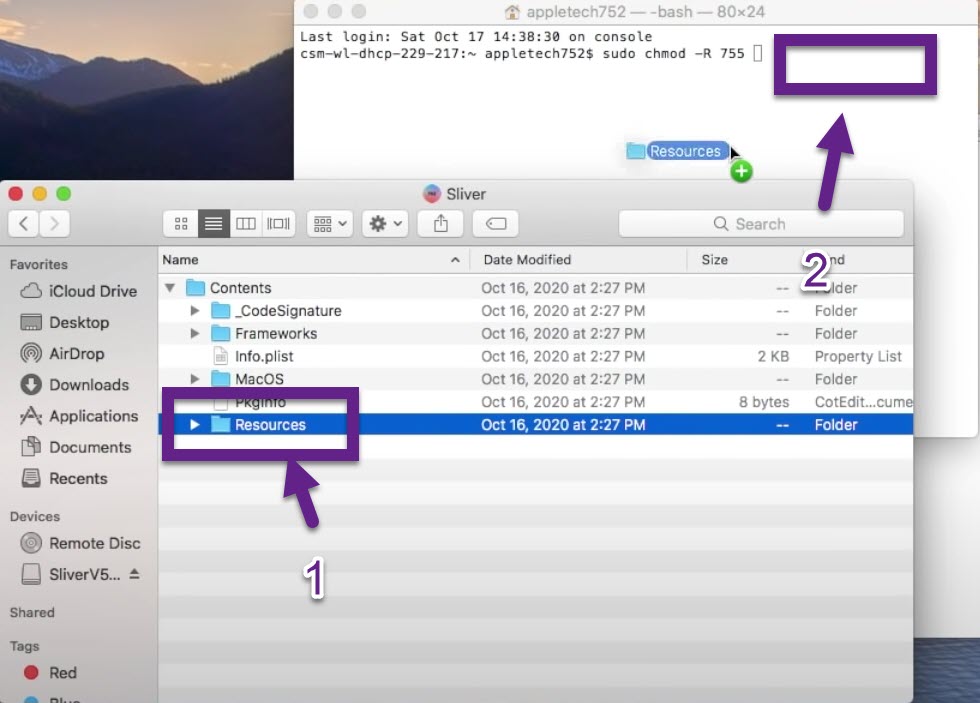
- Enter your computer password

- The Sliver is ready to use.
- Open Sliver then click on Super Special Options.

- iPhone 4 Bypass.

- Enter DFU Mode on Your iPhone 4
- Connect your iPhone 4 to Computer
- Hold the Home + The Power Button at the same times
- As soon as you see the black screen release the power button & Continue to hold the Home button.
- Until a message appears in iTunes telling your iPhone 4 in recovery mode.
- Quit the Itunes then Select your iPhone 4 Model.

- Click on Run limera1n Exploit then click OK.
- The device is now in pwned DFU Mode.

- Click on Load then click Ok
- The iPhone 4 Bypass is Began

- Click on Relay Device Info then Got It.

- Click on Delete Setup.app then click OK
- iCloud Bypass Done from your iPhone 4
DONE UNLOCKED YOUR IPHONE4
👉COMMENT
👉LIKE
👉SHARE
SUBSCRIBE ON MY YOUTUBE CHANNEL
https://youtube.com/channel/UChkPrCECAGFJYAXEMFDIi7Q


 Hello, my name is Jack Sparrow. I'm a 50 year old self-employed Pirate from the Caribbean.
No comments:
Post a Comment